MCP Server
The Mycorr MCP Server connects AI assistants and agents to your Mycorr data over the Model Context Protocol. Claude, ChatGPT, Cursor, VS Code, Codex, Gemini CLI and any other MCP client can use it.
Once connected, an assistant can:
- Find data by name across every Model, Table and Dataset you can read.
- Understand a table: its columns, what they mean, their units, and how it links to other tables.
- Analyze with SQL, column statistics and saved recipes, and chart the result inline.
- Build and maintain tables: create them, load and edit rows, change columns, document them, declare links, and checkpoint before a bulk change.
- Read files attached to rows, and export a table to Google Sheets.
It can only ever do what your account can already do in the app. Every call is checked against your permissions, and writes need a token you created with write access.
Connect
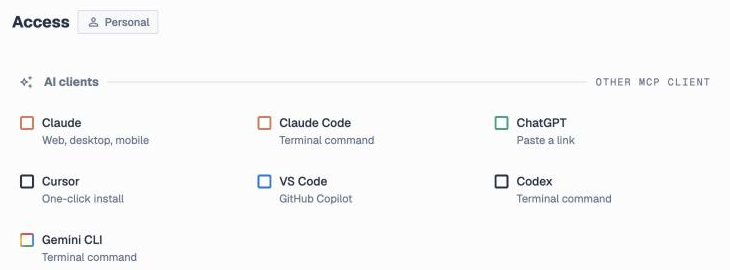
The quickest way is the Access page in Mycorr. Under AI clients, pick your client and follow its steps. Every client signs you in through your browser, so there is no token to copy.
Server URL
| URL | https://space.mycorr.app/mcp |
| Transport | Streamable HTTP |
| Authentication | OAuth 2.1 sign-in, or a Personal Access Token |
Claude
- In Claude, go to Customize → Connectors → Add custom connector.
- Paste
https://space.mycorr.app/mcp. - Approve access in the browser and pick the organization.
On a Claude Team or Enterprise plan, an Owner adds the connector once under Organization settings → Connectors, and each member connects with their own account.
Claude Code, Codex, Gemini CLI
Run one command in your terminal, then approve access in the browser:
claude mcp add --transport http mycorr https://space.mycorr.app/mcp
codex mcp add mycorr --url https://space.mycorr.app/mcp
gemini mcp add --scope user --transport http mycorr https://space.mycorr.app/mcp
ChatGPT
Open Plugins, select +, then Add custom MCP server and paste the URL. On ChatGPT Business and Enterprise, a workspace admin adds it for the workspace.
Cursor and VS Code
The Access page has one-click Add to Cursor and Install in VS Code buttons. To configure by hand, add this entry to your mcpServers (Cursor) or servers (VS Code, with "type": "http"):
"mycorr": {
  "url": "https://space.mycorr.app/mcp"
}
Any other MCP client
Add https://space.mycorr.app/mcp as a remote MCP server and approve access in the browser.
With a Personal Access Token
For a script, a CI job or a client without browser sign-in, create a Personal Access Token and send it as a bearer token:
"mycorr": {
  "url": "https://space.mycorr.app/mcp",
  "headers": {
    "Authorization": "Bearer ${MYCORR_API_TOKEN}"
  }
}
Choose Read & write when you create the token if the agent should change data. A Read-only token can use every read tool and is refused by every write tool.
Treat a token like a password. Keep it in an environment variable, never commit it, and revoke it from the Access page if it is exposed.
One organization per connection
Every connection belongs to exactly one organization.
- The generic URL (
/mcp) asks you to pick the organization when you approve access, if you belong to more than one. Each person who uses a shared connector picks their own. - An organization's own URL (
/org/{org_id}/mcp) skips that choice and locks the connection to that organization. Find it under Organization settings → General → MCP endpoint, or switch Pin to … on in a client's steps on the Access page.
To switch organizations, disconnect and connect again. To use two at once, add each one's own URL as a separate connector.
What a connection can reach:
| Data | Through an organization's connection | Through your personal connection |
|---|---|---|
| That organization's models and tables | Read and write, as your role allows | — |
| Your personal models and tables | Read only, marked "origin": "personal_account" | Read and write |
| Tables shared with you from an organization you are not in | Read, marked "origin": "shared" | Read, marked "origin": "shared" |
| The public catalog | Read | Read |
| Another organization you belong to | Refused. It needs its own connection. | Refused |
A tool never returns the id of something the connection would then refuse, so every id in a response is safe to follow.
How Mycorr data looks to an agent
Models, tables, links, datasets. A model is a workspace of related tables. Tables declare links: the column pairs they join on, which may cross models. A dataset is a curated set of related tables, possibly from several models. It is a shortlist, not a table, and you query its member tables.
Everything is addressed by id. Tables, columns and rows have ids (tab-…, col-…, _row_id). Tools and SQL take ids, never names or positions, so a rename never breaks a query. describe_table hands out the column ids. Row ids come from sample rows, from append_rows for rows you just added, or from selecting "_row_id" in SQL.
Which version you read. Every read reports a served block with the table version and the lens:
- If you can edit a table, you read its latest data (
lens: "live"). - Otherwise you read the owner's release, the version they published (
lens: "released", withreleased_at). Treat that date as the as-of date of your answer. - A table with no release is readable live only by people who can open its model. Anyone else is refused until the owner releases it.
run_sqlreports one entry per table it read, so a join can combine live and released data, and a good answer says so.
Check before you act. describe_table.capabilities says what you may do to a table, such as edit rows, rename or describe it, before you try. Tables imported from another model are read-only here, and so are tables that a recipe writes.
Meaning lives on the columns. A column may carry a description, a unit (with a scale for thousands or millions), and declared intents: primary_key_member, distinct, or nullable: false for a column every row should fill. Read them before choosing columns, comparing values or joining. Intents are declared, not enforced, so treat them as strong hints.
Big integers arrive as strings. A 64-bit integer cell is returned as a decimal string so it stays exact past 2^53. Writes accept a string or a number.
Tools
The server has 36 tools. Your client reads each tool's full parameter schema from the server, so this section covers what each one is for and the rules that matter.
Find and inspect
| Tool | What it does |
|---|---|
search | Finds models, tables and datasets by name in one call. Matching is fuzzy, so it tolerates typos and separators. Descriptions come back for context but are not searched. Start here whenever a question names data. |
list_models | Every model you can read, with its description. |
list_tables | The tables in one model: the ones it owns and the ones it imports, and which of them are recipe results. |
describe_table | A table's columns (ids, types, descriptions, units, intents, formulas), row count, links with their target tables, the datasets it belongs to, its capabilities, and optional sample rows. |
describe_dataset | A dataset's description and the member tables you can read. |
get_maintenance_guide | The rules a dataset's maintainer wrote for keeping it current. Read it before updating a maintained dataset. Most datasets have none. |
list_column_types | Every column type and which types it can be cast to. Static, so call it once. |
search_units | Finds a unit of measurement (QUDT units and currencies) by name, symbol or code, for set_column_semantics. |
Analyze
| Tool | What it does |
|---|---|
run_sql | One read-only SQL query (SELECT, WITH, recursive CTEs, set operations, window functions) over any tables you can read, across models. See Querying with SQL. |
summarize_column | Statistics for one column: null rate, distinct count, and per type min/max/average/median/deciles, category shares, date range with monthly or yearly counts, or the most frequent values. |
visualize | Runs the same SQL as run_sql and draws a Vega-Lite chart, or shows a table's rows as a grid when you pass table_id alone. Hosts that support MCP Apps render it inline; others get the rows. |
audit_link | Measures a declared link against the data: one-to-one or fan-out, how many rows a join would drop, and which key values are orphans. Run it before trusting a join. |
Recipes
A recipe is a saved, parameterized SQL definition in the organization's catalog. People run it on the canvas and agents run it here, so a metric gets one definition instead of five that disagree.
| Tool | What it does |
|---|---|
describe_recipe | What a recipe computes, its parameters and slots, and the joins no link vouches for. Call it before run_recipe. |
run_recipe | Runs a recipe with arguments and returns rows. Defaults to 1,000 rows, at most 100,000. |
materialize_recipe | Saves a recipe's answer into a model as a real table, with no row limit. Re-running with the same arguments rewrites that table in place. |
create_recipe | Saves a new recipe. Refused if an existing recipe already reads the same tables and columns: widen that one instead. |
update_recipe | Widens or redefines a recipe as a new version. Changing a published recipe's meaning needs accept_redefinition: true. |
delete_result | Deletes a recipe's result table. This is the only table an agent can delete, because the recipe can rebuild it. Only collaborators and managers of the model's space can. |
Build and change tables
These need a Read & write connection and edit access to the model.
| Tool | What it does |
|---|---|
create_table | Creates a table with typed columns. In the same call you can give the table and each column a description, unit and intents, and categorical columns their labels. |
add_column | Adds a column. |
rename_column | Renames a column. |
cast_column | Converts a column to another type by adding a new column with the converted values. The original stays until you delete it. |
delete_column | Soft-deletes a column. It can be restored in the app. A table's last column cannot be deleted. |
update_categories | Adds, renames or removes a categorical column's labels. |
set_column_semantics | Sets what columns mean (description, unit, intents) for the whole table in one call. |
set_table_metadata | Renames a table or sets its description. |
checkpoint_table | Saves a named, permanent checkpoint of the current version. Take one before a bulk change. |
Write rows
| Tool | What it does |
|---|---|
append_rows | Adds up to 1,000 rows per call, as objects keyed by column id or as arrays in a declared column order. |
edit_rows | Updates, soft-deletes or restores rows by row id, up to 1,000 per call. Use it when each row gets different values. |
update_rows_where | One UPDATE … SET … WHERE … with the same SQL dialect as run_sql. You must declare how many rows you expect (max_affected_rows or expect: "exactly_one"). A filter that matches more is refused, and nothing is written. |
A value that does not fit its column is refused, never stored by quietly retyping the column. Cast the column first, then write to the new one.
Links
| Tool | What it does |
|---|---|
create_link | Declares the columns two tables join on. Several column pairs make one composite key. Declaring an existing link again returns the existing one. |
delete_link | Removes a link that an agent made for you. A link a person drew stays, for that person to remove in the app. |
Files
| Tool | What it does |
|---|---|
read_attachment | Reads a file from a row's attachment column as an image: one page of a PDF, or a PNG, JPEG, GIF or WebP picture. Other formats are refused. |
Attachments are otherwise read-only to agents. An agent sees file names but cannot add, remove or clear files, and in SQL the column reads as text. To open a file, a person uses the table link that describe_table returns as app_url.
Google Sheets
| Tool | What it does |
|---|---|
export_to_gsheet | Exports a table to a new spreadsheet, or to a new or overwritten tab of an existing one. |
list_exportable_spreadsheets | The spreadsheets Mycorr may write to: ones it created and ones you picked in the app. It cannot list your whole Drive. |
list_sheets_connections | Your connected Google accounts with Sheets access. |
A new spreadsheet always works. If several Google accounts are connected, the export answers status: "choose_account". That is a question to put to the user, not a failure.
Querying with SQL
run_sql, visualize and update_rows_where use the DataFusion SQL dialect.
- Use ids in double quotes:
SELECT "col-019e…" FROM "tab-019e…". Column names are not accepted. - Any tables you can read can be queried together, across models.
- Join along declared links. A join on a column pair that no link declares still runs, but the response names it in
unlinked_joins, a warning to pass on. Joining on part of a composite key warns too. A bareCROSS JOINwith no condition is refused. - Deleted rows are excluded automatically. Do not filter on
_is_row_deleted. _row_idis selectable. It is the handleedit_rowstakes. Add anORDER BYif you pair ids with values across two queries.- Time differences:
mycorr_seconds_between(a, b)returns seconds andmycorr_days_between(a, b)returns days. Plaina - bgives an interval thatAVGandSUMcannot use. - Lists: an empty list is stored as
NULL, so to find rows whose list lacks a value useNOT COALESCE(array_has(col, x), false).
Statements that change data (INSERT, UPDATE, DELETE), DDL, COPY, SET and EXPLAIN are refused by run_sql.
A good workflow
searchfor what the question names. A dataset hit is a curated shortlist; open it withdescribe_dataset.describe_tablefor column ids, meaning, units and links.audit_linkif the answer depends on a join you have not checked.run_sqlorsummarize_columnfor the numbers. Never estimate a count or a sum: compute it.- Say which version you read when a table was released, and pass on any
unlinked_joins.
Writing safely
- Retries. Pass
idempotency_keyoncreate_table,append_rowsandadd_column, so a retry after a dropped response cannot create duplicates. The other write tools give the same result when repeated. - Concurrency. Pass the
expected_versionyou read on writes that take it. If someone wrote first, the write is refused withversion_conflict: re-read and try again. - Blast radius.
update_rows_wherealways states how many rows it may change. - Undo. Deleted rows and columns are soft-deleted and can be restored. Take a
checkpoint_tablebefore a bulk change so the whole table can go back. - What agents cannot do. Delete a table (only recipe results), change attachments, delete a link a person drew, or write to a table imported from another model, written by a recipe, or reached read-only through a personal account.
Errors
A failed call that you can act on comes back as a tool result with isError: true and a body of {code, reason, message}.
| Code | Name | What to do |
|---|---|---|
| −31001 | Permission denied | You lack access. Tell the user; retrying with other arguments will not help. |
| −31002 | Resource limit | A batch was too big, or a plan allowance is used up (storage_quota_exceeded, egress_quota_exceeded, mcp_quota_exceeded). The message carries the figures and the date the allowance returns. Nothing was written. Split the batch, or pass the message on and stop. |
| −31003 | Version conflict | Someone else wrote first. Re-read the table and retry. |
| −31004 | Type change refused | A value does not fit its column. Check list_column_types, cast_column, then write to the new column. |
| −31005 | Server busy | No query capacity right now. Retry after a short wait. |
| −31006 | Table mid-commit | A person has uncommitted changes open on the table in the app. Wait for them to apply or discard; do not retry right away. |
| −31007 | Cast refused | A strict cast found values that do not convert. The message says how many. Nothing changed. |
| −31008 | Invalid column | A declared column was refused before anything was made, for example a key on a type that cannot hold one. The message names the column. |
Limits and allowances
| Limit | Value |
|---|---|
Rows returned by run_sql / visualize | 10,000 by default, 100,000 at most |
Rows returned by run_recipe | 1,000 by default, 100,000 at most |
| Query time and memory | 30 seconds, 1 GiB per query |
Rows per append_rows / edit_rows call | 1,000 |
Columns per create_table call | 256 |
Tables in a model before create_table is refused | 200 |
Links checked per audit_link call | 3 |
Monthly allowances. Tool calls count against the organization's monthly MCP allowance, and data an assistant reads counts toward its egress allowance. See Usage and Limits for the figures on each plan. A call that fails because of something on Mycorr's side is refunded.
Rate limit. Requests are rate-limited per account. Past the limit the server answers 429 with a Retry-After header, and clients back off and retry.
Example prompts
"Find anything about billing in my Mycorr data and tell me what we invoiced this year."
search for billing and invoices, describe_table on the best hit, then run_sql for the total.
"Which product categories bring the most revenue from enterprise customers? Chart it."
search and describe_table find the tables and the links between them, audit_link checks the join, and visualize charts the grouped query.
"Create a Suppliers table with name, country and annual spend in euros, and load these rows."
search_units for the euro, create_table with the columns, their descriptions and the unit, then append_rows.
"Mark every open ticket older than 90 days as stale."
describe_table for the column ids, checkpoint_table, then update_rows_where with the expected number of rows.
"Run the monthly revenue recipe for Germany and save it in my Finance model."
describe_recipe for its parameters, then materialize_recipe.
Permissions and data handling
- Your access, nothing more. Every call is checked against your permissions as they are now. Revoking someone's access in Mycorr takes effect on their next call.
- Read-only tokens stay read-only. A Read-only token or connection cannot change anything, whatever the agent asks.
- Trashed items are hidden. Models and tables in the Trash are left out of every listing.
- Ending access. Remove the connector in your AI client. A Personal Access Token is revoked from the Access page.
- Data handling. Queries run inside Mycorr, and only the results go to the assistant you connected. See the Privacy Policy.
Support
Questions or problems with the MCP server: support@mycorr.app.