Personal Access Tokens
A Personal Access Token (PAT) lets a script, a scheduled job, the Python SDK or an MCP client act as you without a browser sign-in. Anything a token does is checked against your own permissions, exactly as if you did it in the app.
For AI assistants that can sign in through the browser (Claude, ChatGPT, Cursor, VS Code, Claude Code, Codex, Gemini CLI), you don't need a token. Connect them from AI clients on the same page instead. See MCP Server.
Create a token
- Open Access in the sidebar.
- Under Personal access tokens, click New token.
- Fill in the dialog and click Generate.
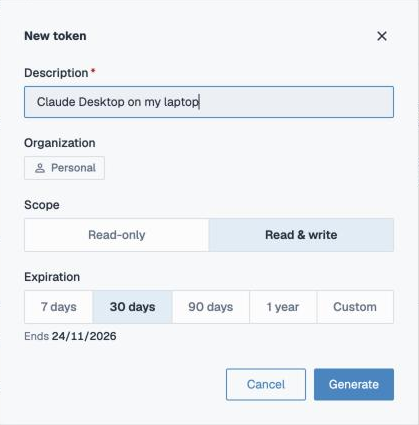
| Field | What it means |
|---|---|
| Description | Required, up to 60 characters, and unique among your tokens. Name it after where it will live, such as "Claude Desktop on my laptop", so you know which one to revoke later. |
| Organization | The organization the token belongs to: the one you are working in when you create it. A token can only reach that organization's data. To use another organization, switch to it first and create a token there. |
| Scope | Read-only reads data. Read & write can also change it: create tables, write rows, change columns, declare links. Pick the narrowest scope the job needs. |
| Expiration | 7 days, 30 days (the default), 90 days, 1 year, or a Custom date up to a year away. |
Copy the token right away. It is shown once, in the Copy your token dialog, and never again. If you lose it, revoke it and create a new one.
Use a token
Send it as a bearer token in the Authorization header:
Authorization: Bearer <your token>
Keep it in an environment variable rather than in code:
export MYCORR_API_TOKEN="<your token>"
Use a token with Python on the Access page shows the commands to install the Python SDK and set the token. For an MCP client, see Connecting with a Personal Access Token.
Manage tokens
The list shows each token's description, scope (Read or Read & write), creation date and expiry. A search box appears once the list is long.
- Revoke stops an active token at once. Anything still using it starts getting refused on its next request.
- Expired and revoked tokens move to their own list. Remove deletes one from there for good.
Keep tokens safe
- Treat a token like a password. Never commit it to version control or paste it into a shared document.
- Give each place that uses a token its own token, so you can revoke one without breaking the others.
- Prefer Read-only and a short expiry. Create a new token when one expires.
- If a token may have leaked, revoke it immediately.
Tokens are signed JSON Web Tokens. Mycorr checks the signature, the expiry and whether the token was revoked on every request.